What is a SteamID? How to view yours
A SteamID identifies your account. An AppID identifies a game.
Definition
A SteamID identifies a Steam account. The long number under the heading on the store Account page (usually starting with 7656) is your SteamID64. It is not a game AppID.
The same account can also be written as a shorter SteamID32 (AccountID) or SteamID3. This site's tools convert those formats. First, here is how to see your SteamID64 on the official site.
How to view your SteamID
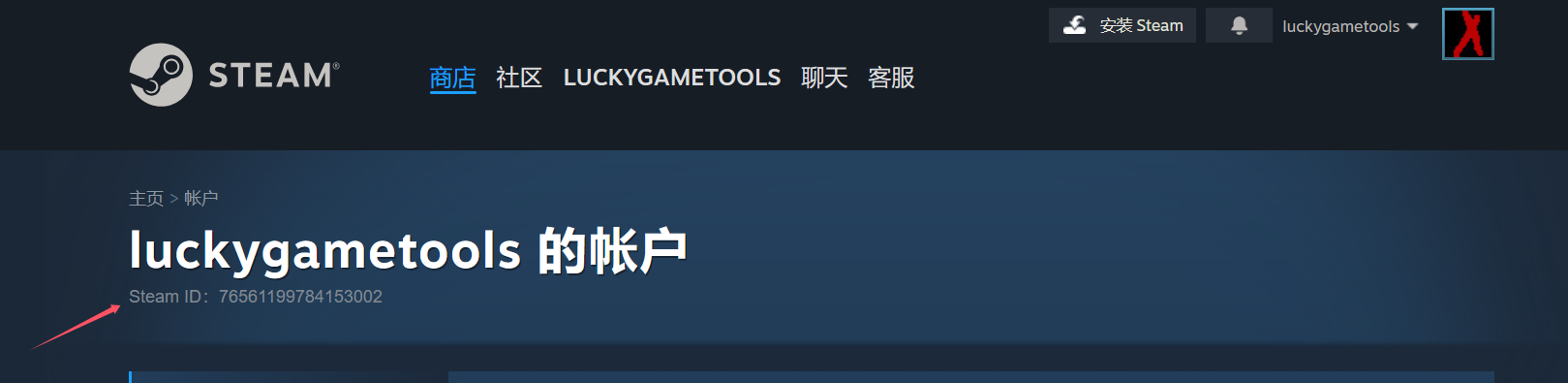
steamcommunity.com/profiles/ in your profile URL is the same SteamID64.Term mapping
SteamID64
The long number on the account page, e.g. 7656119…
SteamID32
Shorter AccountID; convert from 64-bit with the tools
AppID
A game or app number, not an account identifier
How it shows up in LuckyGameTools
- Sharing libraries or asking for support often needs your SteamID64.
- The toolbox converts IDs in the browser and does not ask for your password.
- Use AppID for games. Use SteamID for the account.
SteamID64 on the account page is a public identifier. Still avoid posting login tokens, CDKs, or mystery codes.
Common misconceptions
Is a SteamID the same as a game AppID?
No. A SteamID points at an account. An AppID points at a game or app.
Which format is shown on Account details?
The store account page shows SteamID64, the long number that starts with 7656.
Why does SteamID32 still appear?
Some tools and older formats use the shorter AccountID. Convert it with this site's utilities instead of doing the math by hand.