LuckyGameTools
CDK Exchange Guide
At present, it is only open to users who have donated before, and a portion will be given as a gift when donating CDK, You can contact the author to continue donating separately and obtain more in the future CDK
Your SteamID level permissions are saved in, https://github.com/luckygametools/steam-cfg/tree/main/gameauthdb/76561199784153002 (Replace 76561199784153002 with your SteamID)
CDK Usage Guide
The new version has built-in CDK generation: you no longer need to find the Steam group bot or manually send the drm+AppId+|+CDK command.
1
Open LuckyGameTools and select the game you want to launch from the game list on the left.
2
In the CDK Exchange Mystery Code dialog, confirm the game AppID. Keep the type as DRM in most cases.
3
Enter the CDK and click Generate. Once the mystery code is generated successfully, the selected game has been activated.
4
Click Launch Game and wait for the game to start.
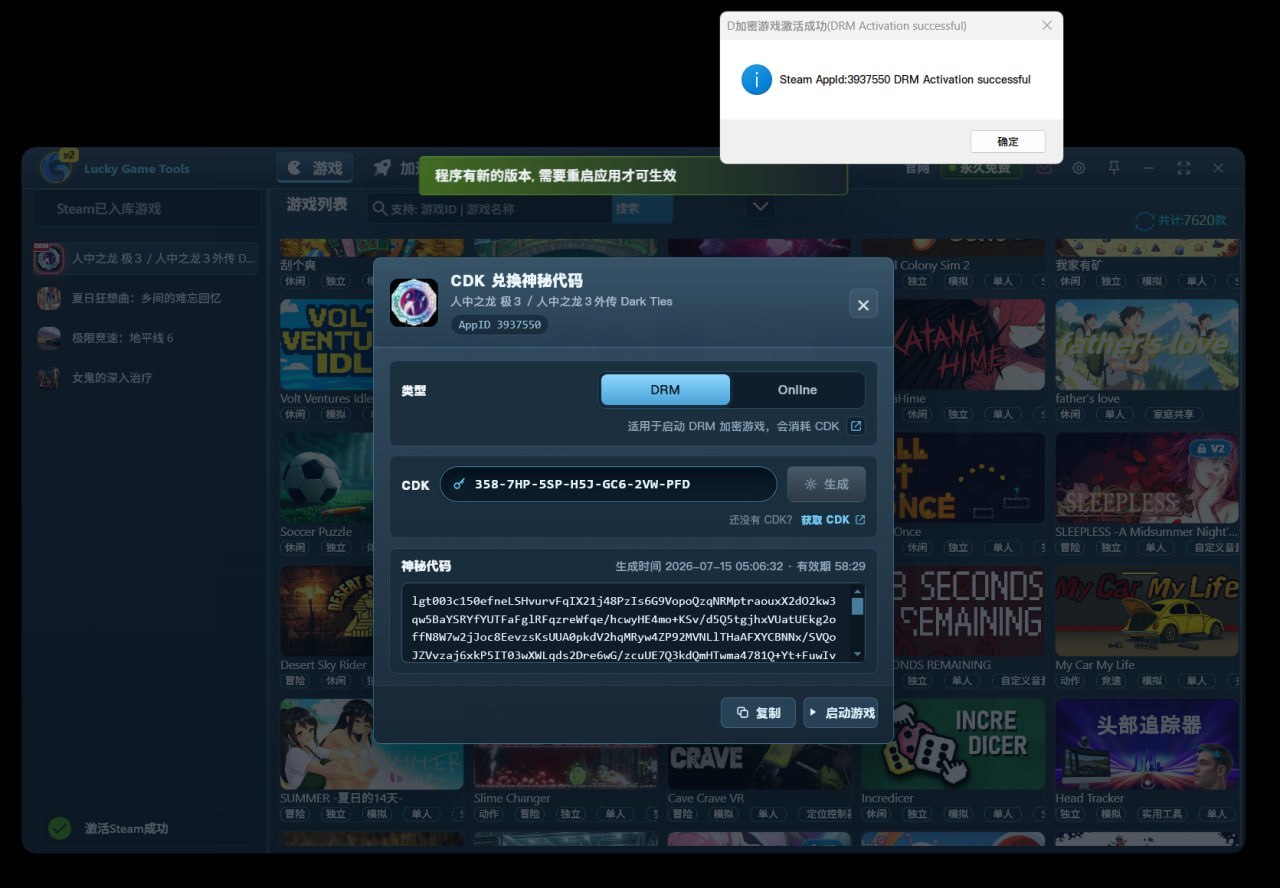
The legacy method is only for users still using versions before 6.0.3.152. For newer versions, use the "6.0.3.152+ New Flow" tab first.
Bot Usage Notes
1
Older versions used the luckygametools-bot to exchange a CDK for a mystery code.
2
One CDK can generate one mystery code. After use, the CDK becomes invalid automatically.
3
The generated mystery code can only be used with the current Steam account.
4
Please save your CDK after receiving it. It will not be reissued, and it remains valid until used.
Legacy Exchange Steps
1
Find the luckygametools-bot in the LuckyGameTools Steam chat group. The bot has a specific bot role. Make sure it is online before sending commands.

2
Right-click the bot avatar, choose "Send Message", and send the command in this format: drm1234567|AAA-BBB-CCC-DDD-EEE-FFF-GGG
Replace 1234567 with the game AppID and replace the following text with your CDK. The vertical bar | must come right after the AppID.

Replace 1234567 with the game AppID and replace the following text with your CDK. The vertical bar | must come right after the AppID.
3
If Steam says you do not have permission or the bot does not respond, send callboss or callbot in the Steam group.

4
If the bot still cannot reply normally, send drm1234567|AAA-BBB-CCC-DDD-EEE-FFF-GGG directly in the Steam group. The bot will delete the CDK command after receiving it and privately send the mystery code.
Legacy Online Command
1
online1234567|AAA-BBB-CCC-DDD-EEE-FFF-GGG was used for some single-player games that still require online verification after startup, such as 1250410 Microsoft Flight Simulator.
2
This command is free for donation users and does not consume a CDK. It is only used for verification.
3
This command generates a mystery code starting with lot.
CDK Usage Notes
1
For version 6.0.3.152 and later, use the built-in flow to generate mystery codes first.
2
One CDK can generate one mystery code. After use, the CDK becomes invalid automatically.
3
The generated mystery code can only be used with the current Steam account and the selected game AppID.
4
Please save your CDK after receiving it. It will not be reissued, and it remains valid until used.
If the mystery code is generated successfully but the game was not launched in time, return to the same game page to generate it again or contact the author for help.